All products
OHS

OHS app

Deadlines that keep track of themselves

Medical examinations, training, permits and contracts with deadlines that remind you on their own. Badge or PIN login, online training on a phone or kiosk, reports with export.

  • Notifications at 30 / 60 / 90 days
  • Required versus held
  • Log in with a badge or PIN
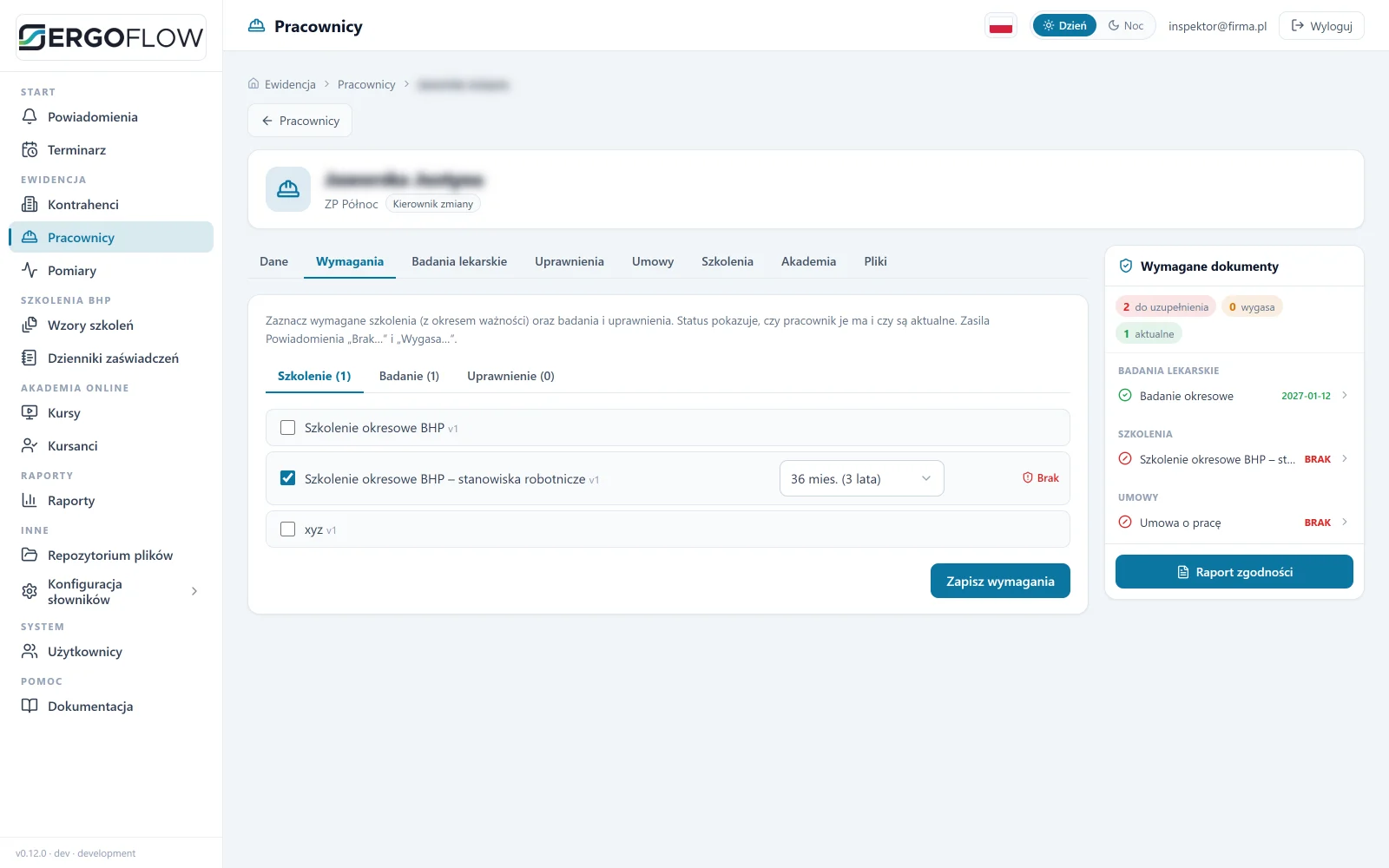
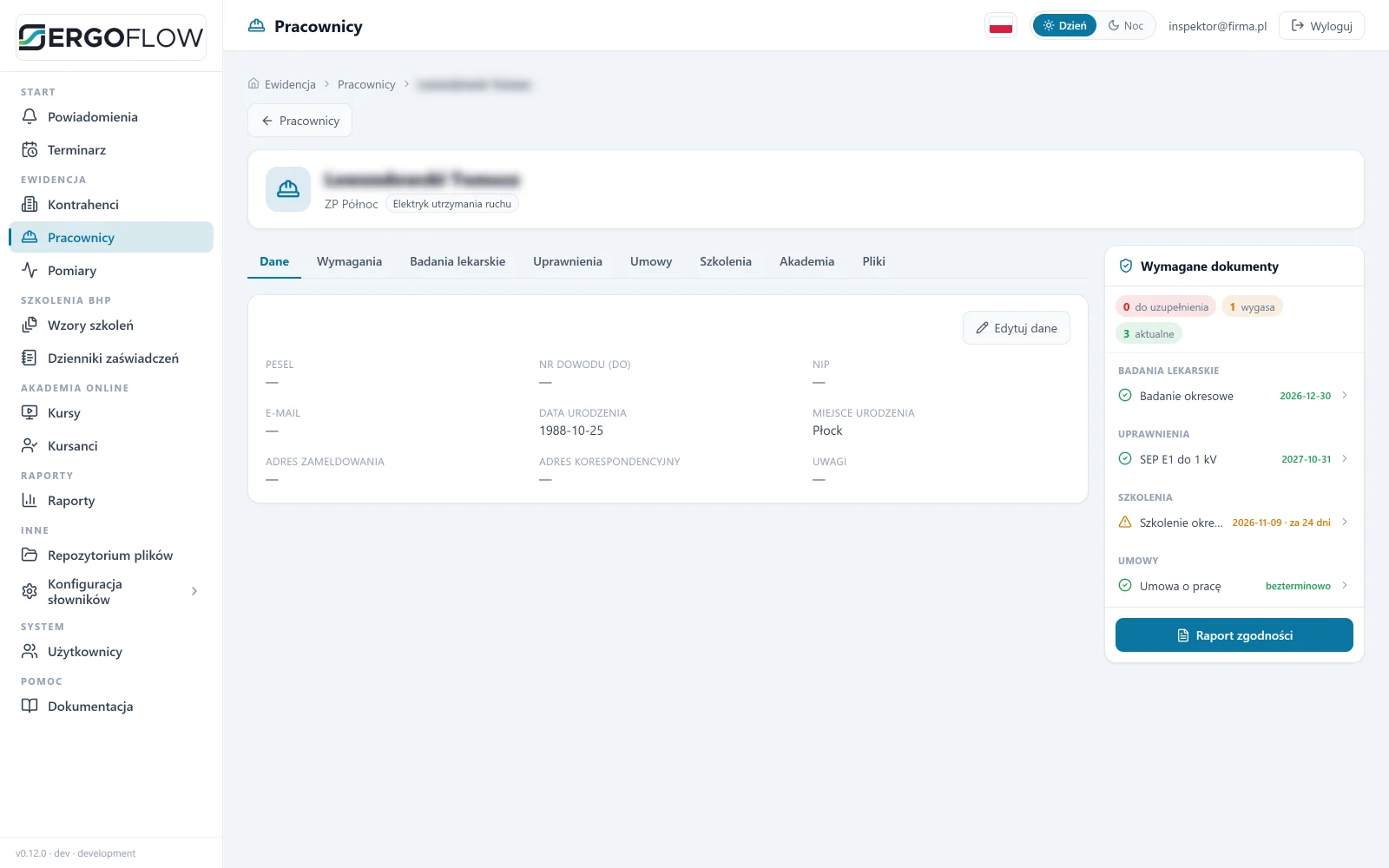
OHS app screen: employee record with requirements, history and what's next.
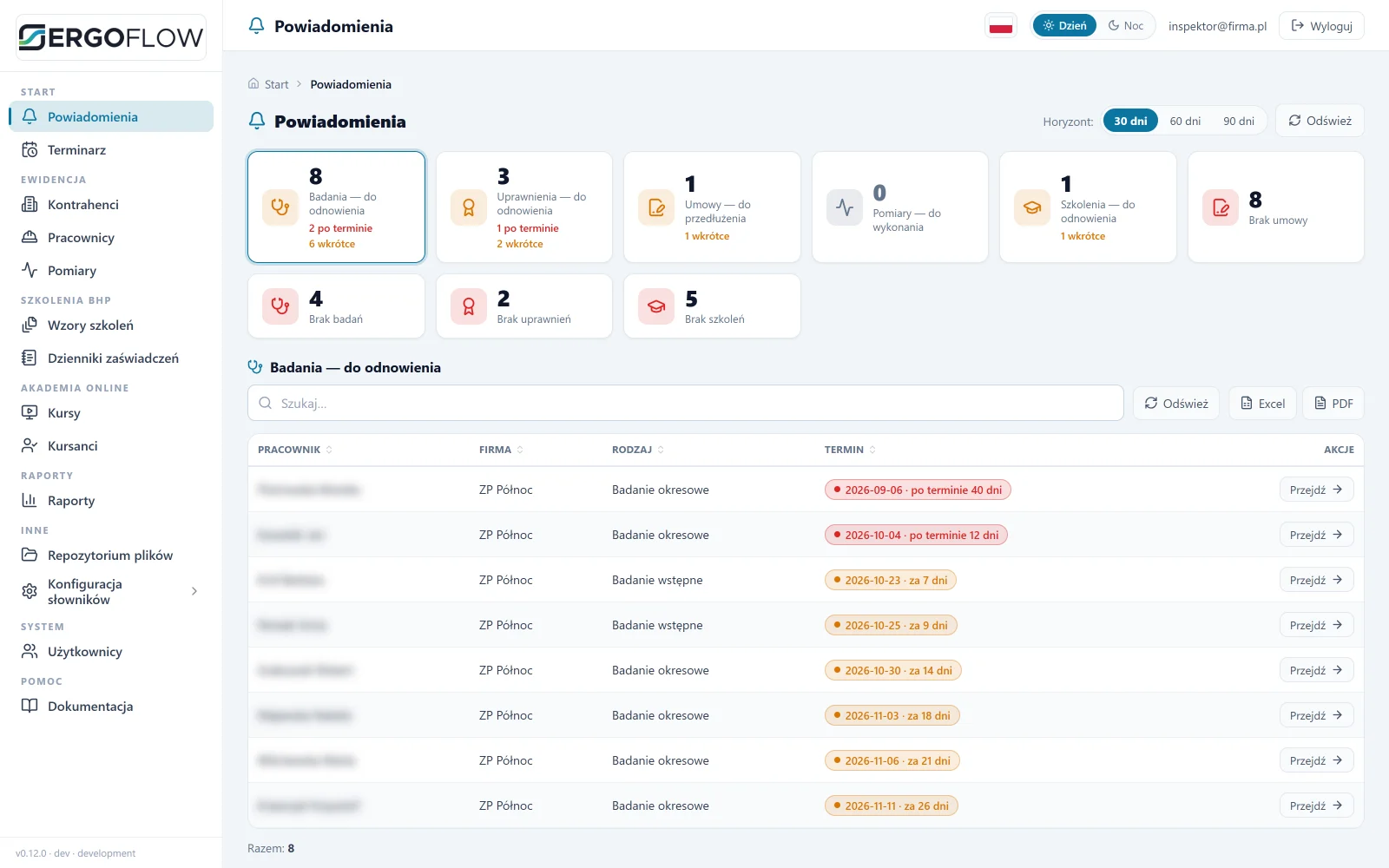
Notifications screen: what is expiring, what is missing and for whom. Data from a test instance, names blurred.

One screen to start the day: what is expiring, what is missing, for whom. The rest is a register in which every document has a deadline and a colour.

What you gain

Key benefits

Notifications at 30 / 60 / 90 days“Expiring” and “missing” tiles with the number of people. A click opens a list for export.
Required versus heldA set of requirements per employee or contract. Gaps are calculated from the comparison.
Log in with a badge or PINThe employee taps their badge on the kiosk or enters a PIN. No account, no e-mail.
Online trainingCourse, test with a pass mark, score on the employee record. Phone, computer or kiosk.
Many companies, one accountFor external OHS officers: company filter, export for the client.
1:1 export from the screenExcel and PDF with the same columns, sorting and filters.
OHS app screen: requirements matrix by job position — periodic medical examination, periodic training, on-the-job instruction, SEP, UDT, work at height, first aid — with validity periods.
Requirements by job position: the “missing” and “expiring” notifications come from this matrix.
Requirements

Set it once, it keeps track by itself

You set requirements per job position: which medical examinations, permits and training, and how long they are valid. The app compares them with what the employee has and shows the gaps.

  • Examinations, permits, contracts, training on one record, each with a due date.
  • Compliance report with one button, to PDF.
  • Files attached to the employee certificates and referrals in the repository.
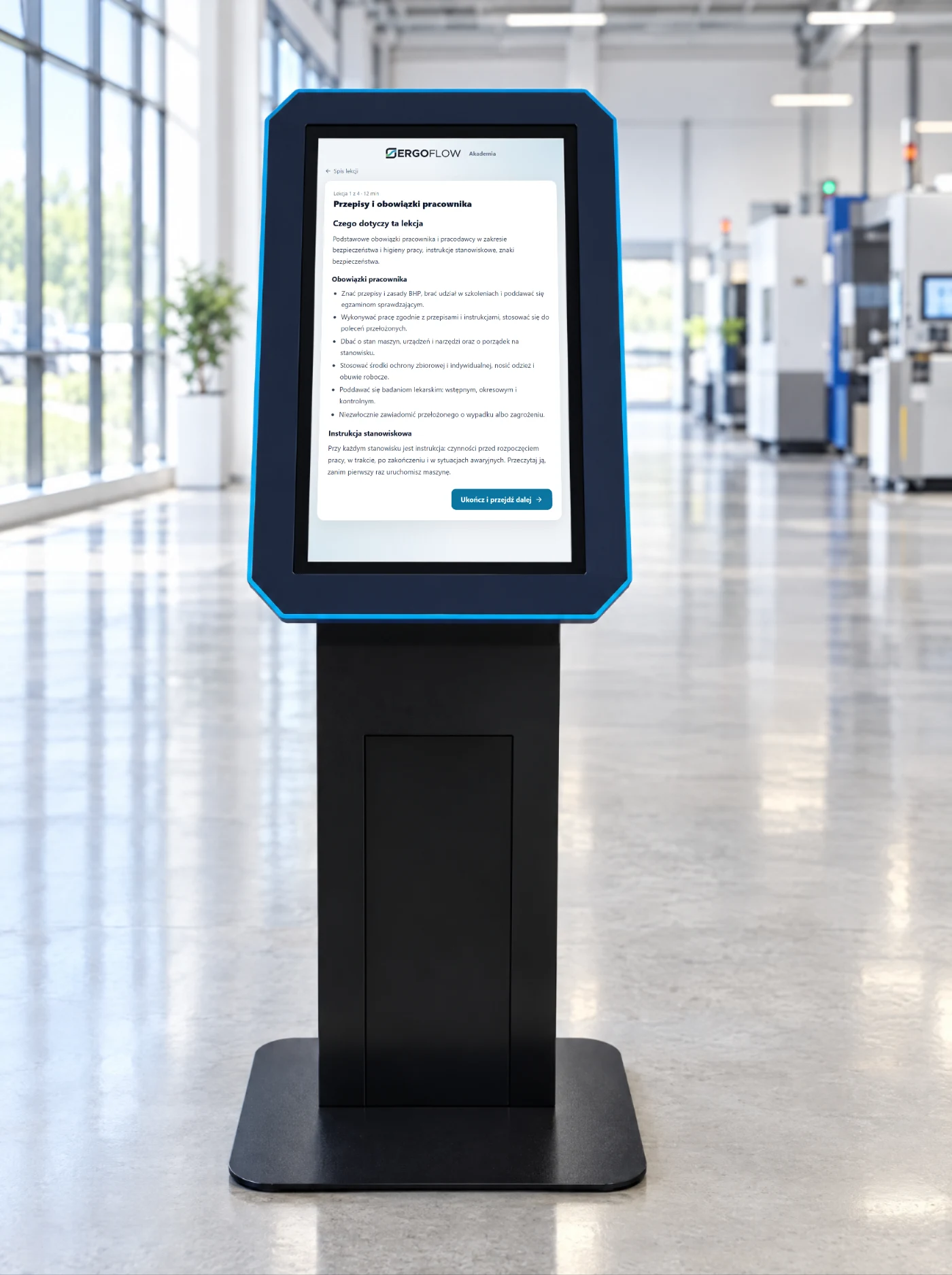
Touchscreen kiosk in the production hall, with an OHS training lesson on screen.
Shop-floor kiosk with a lesson from the Academy.
Online Academy

Training where the employee is

A course with lessons and a test. The employee logs in with a badge or PIN at the kiosk, or opens a link on their phone.

  • Pass mark set by the OHS officer, and so is the attempt limit.
  • Progress on the record who started, who finished, with what score.
  • Kiosk with dedicated software workstation instructions, courses, surveys, item documentation.
Screens

What it looks like inside

Click to enlarge. Sample data, names blurred.

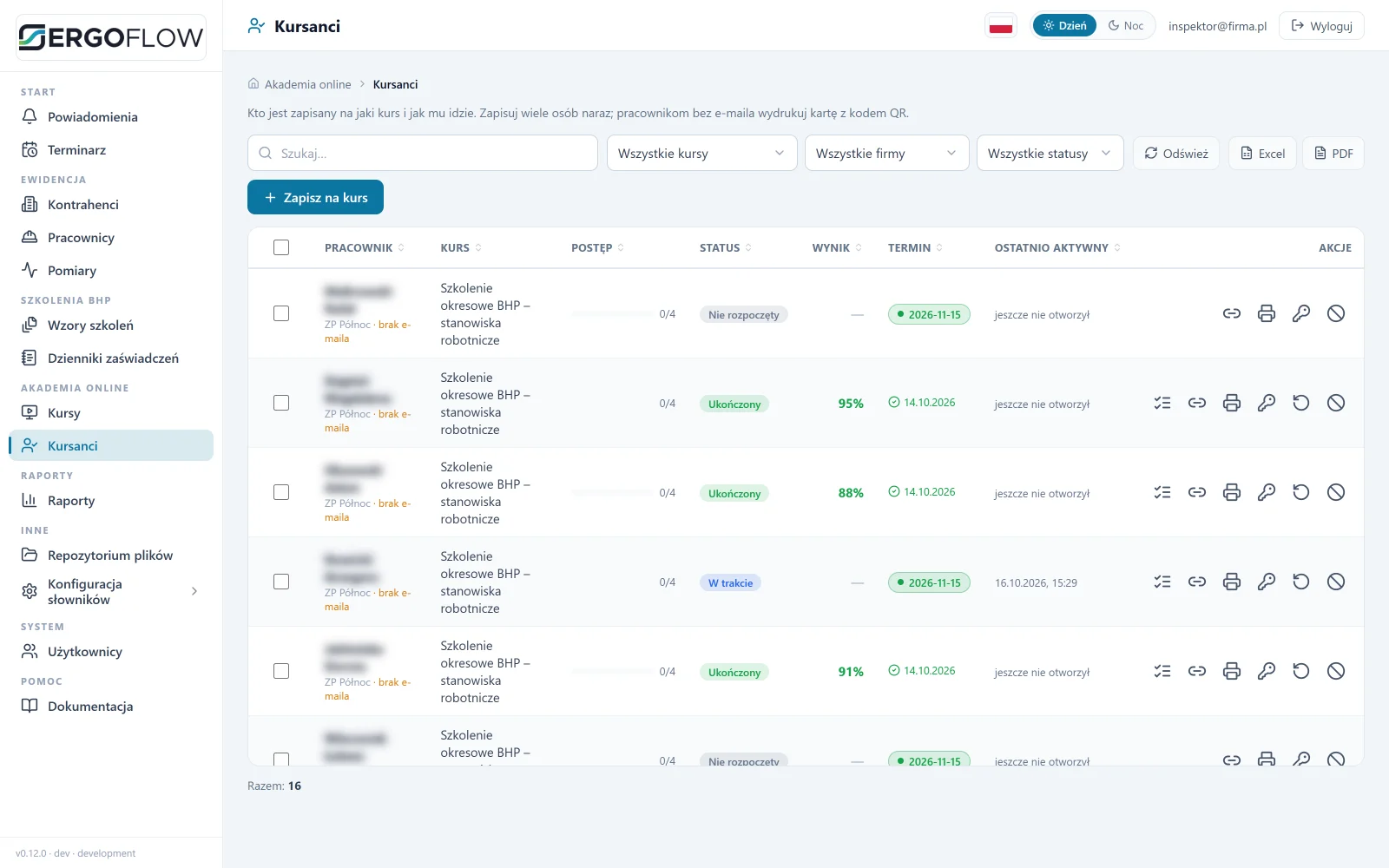
OHS app screen: trainees with progress, status, test result and deadline.
Learners who is on which course, progress and score.
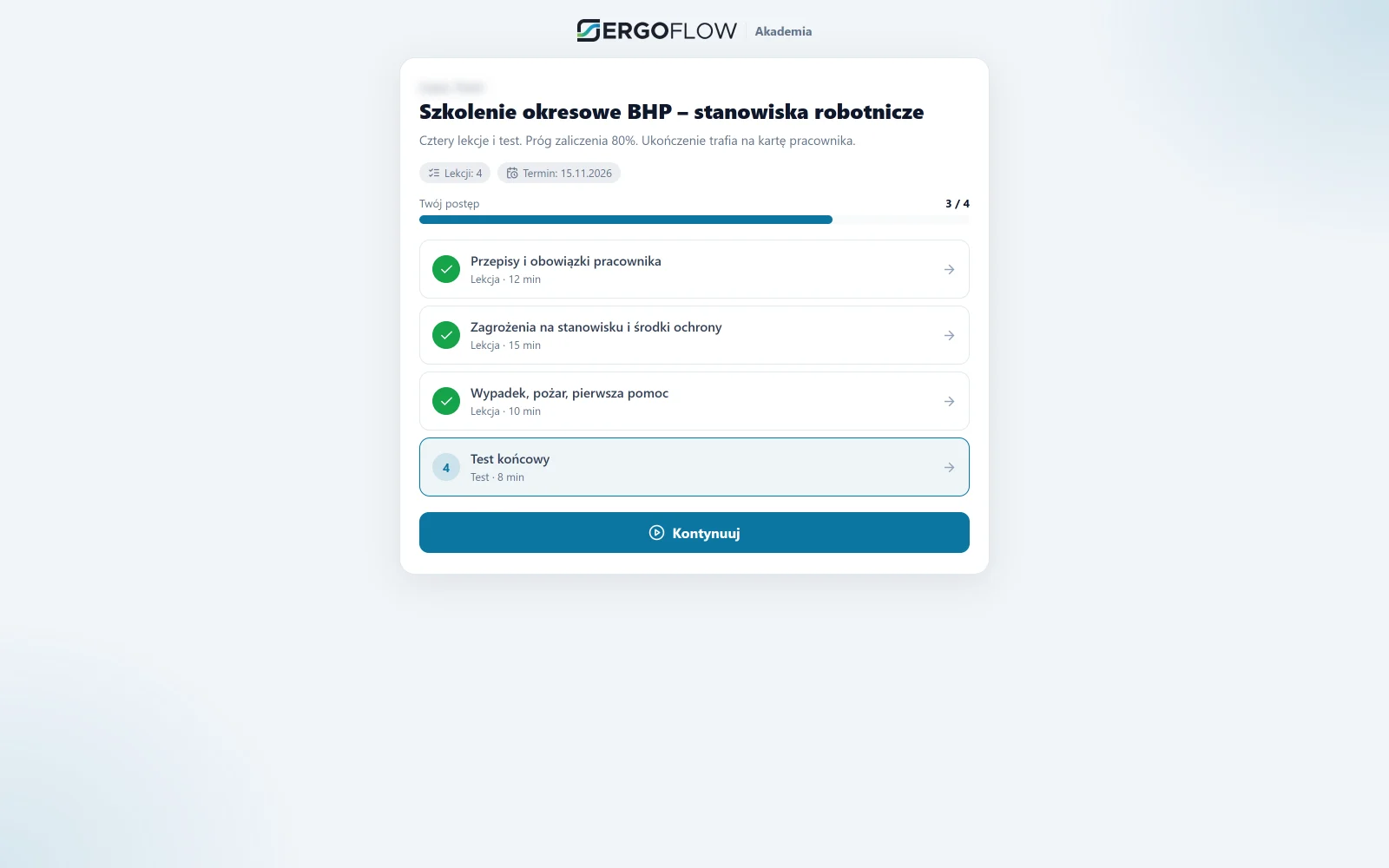
OHS app screen: a course with three completed lessons, a final test and a sample question.
Learner portal lessons ticked off, a test at the end, the score goes to the record.
OHS app screen: employee record with requirements, history and what's next.
Employee record requirements, history, what's next.
Tailoring

This is our proposal, not an off-the-shelf template

We show the OHS app in the form it runs in on our side. We tailor the scope to the company: from changes to existing modules to an app built from scratch for your process.

Option 1

As it is

Ready-made modules: deadlines, requirements, Academy, kiosk, reports. Rollout with your data.

  • start after the audit
  • Your positions and requirements
  • online training from day one
Option 2

Tailored to you

The same modules, but with your rules: different deadlines, your own documents, a report for the auditor, HR integration.

  • changes to modules
  • your own documents and reports
  • connection to your systems
Option 3

Completely new

When the process looks like nothing on this page. We design and write an app for the specific company, on the same back end.

  • design starting from a mock-up
  • your own modules and workflows
  • the same team and maintenance
Who it's for and why

OHS app for companies: what it does day to day

The OHS app from ErgoFlow is software for recording employees' training, medical examinations and permits that keeps track of deadlines instead of a person with a spreadsheet. It was built for manufacturing and logistics companies where most of the workforce works on the shop floor, has no company e-mail and changes positions more often than a binder can keep up with.

OHS training, medical examination and permit records in one place

The employee record holds the full set: induction and periodic training, on-the-job instruction, pre-employment, periodic and follow-up medical examinations, permits (SEP, UDT, work at height), contracts. Each document has an issue date, an expiry date, a scope and a change history, so it is evidence, not a note. This corresponds to the obligations under Art. 229 and 237³ of the Polish Labour Code and the regulation of 27 July 2004 on OHS training.

Requirements by job position instead of a calendar

Instead of entering deadlines separately for everyone, you set once what a job position requires and how long it is valid. The app compares the requirements with what the employee has and shows the gaps: “missing”, “expires in 24 days”, “overdue”. A change of position immediately shows what is missing for the new one, for example on-the-job instruction.

Deadline notifications with escalation

The reminder goes out with the lead time you set (30, 60, 90 days): to the employee, the manager and the OHS team. A deadline that has passed lands on the dashboard as “not cleared to work”, not in the archive. A report for a National Labour Inspectorate (PIP) inspection, for a department or the whole company, comes out in PDF and Excel with one button.

Online OHS training where the regulations allow it

The employee completes periodic training in the form of guided self-study in the Academy: lessons, a test with a pass mark, a numbered certificate saved to the record. The app distinguishes positions for which this form is permitted from those that require on-the-job instruction or a course. Someone without e-mail logs in with a badge, a PIN or a QR code, on their own phone or at a shop-floor kiosk.

An online OHS system instead of Excel and a binder

Question Spreadsheet and binder OHS app
Who can’t go onto the shop floor today? filtering columns, comparing dates a “not cleared to work” list on the dashboard
Employee changed position manual change in several places requirements and gaps straight away
Proof after an accident or during an inspection a date in a cell, a scan in an e-mail a document with a number, date and history
Periodic training outside the spreadsheet online, with a test and a certificate
Employee without e-mail not applicable badge, PIN, QR code, shop-floor kiosk

Who it’s for

Manufacturing companies, warehouses and logistics, service and maintenance, construction: wherever there are specialist permits, changes of position and people without a computer. For a dozen or so people in one position, a spreadsheet is enough, and we say so plainly.

Rollout

We start by importing your current records (spreadsheet, HR system), set requirements for each job position, launch one department as a trial, then the rest. We tailor the app to the company or build it from scratch for its process, together with a shop-floor kiosk and protective equipment issued from a dispensing machine. Description of the whole module: OHS at ErgoFlow.


OHS news

Deadlines, regulations, practice

Articles with their legal basis: training, medical examinations, PPE, labour inspections (PIP). A new one every week.

OHS

On-the-job OHS instruction: when it is mandatory, who gives it, how long it takes

On-the-job instruction is the second part of induction training. When it has to be repeated, who can give it, how many hours it must last and what stays on file.

Read
OHS

Occupational risk assessment: who carries it out, when to update it, what to record

The occupational risk assessment determines PPE, on-the-job instruction and medical examinations. Who carries it out, after which changes it must be updated and what the document must contain.

Read
OHS

A register of employees' medical examinations and qualifications: how to keep it so nothing expires

Periodic examinations, SEP, UDT, work at height: each has a different deadline and a different source. How to build one register, who is responsible for it and how to show it to an inspector.

Read
Questions

OHS app: frequently asked questions

Briefly, without the marketing. We show the rest in a demo on your data.

Which companies is the OHS app for?

For companies where examination, training and permit deadlines apply to many people in different positions: manufacturing, logistics, warehouses, plants with shift work. It is also used by OHS officers who serve several companies at once.

Can you build an OHS app dedicated to our company?

Yes. What you see on this page is our proposal. We can modify it to fit your processes and documents or build a completely new app for the specific company. Scope and timing are agreed after the audit.

Does the OHS app work online, without installation?

Yes. It is a web app: the OHS officer works in a browser on a computer, and the employee completes training on a phone or at a kiosk on the shop floor. Nothing needs to be installed at the workstations.

How does an employee log in to training?

With an employee badge at the kiosk reader or a PIN code. No e-mail address or password is needed, so someone who has no work computer can complete the training.

Which deadlines does the app track?

Pre-employment, periodic and follow-up medical examinations, induction and periodic OHS training, permits (e.g. forklifts, UDT, electrical), contracts and other documents with an expiry date. A notification goes out 30, 60 and 90 days before the deadline, and the employee record shows the gaps.

Does the OHS app replace the OHS team?

No. It replaces the binder and the spreadsheet: it calculates deadlines, shows gaps and generates a compliance report. Decisions, on-the-job instruction and risk assessment remain with the OHS officer.

Is OHS training in the app compliant with the regulations?

Periodic training in the form of guided self-study is permitted for employers, managers, engineering and technical staff, and administrative and office staff (regulation of 27 July 2004). On-the-job instruction and periodic training for manual worker positions take place at the workstation — in that case the app stores the date and the confirmation.

How much does the OHS app cost?

Quote after the audit: it depends on the number of employees, the sites and whether shop-floor kiosks or PPE dispensing machines are added. In the demo we show the app on your data and finish with a list of what makes sense for you.

Specifications

Technical data

We agree the integration scope and configuration at the audit.

Role
OHS records and online training for companies and external OHS officers
Master data
client → job positions → employees; company details from the VAT white list by tax ID (NIP)
Deadlines
medical examinations, training, permits, contracts, measurements; validity colours, 30/60/90-day horizon
Requirements
per employee or contract; training validity of 6, 12, 24, 36 or 60 months
Academy
courses with lessons and a test, assignment per person, access by link or QR card
Reports
certificate register, annual plan, staff records; Excel and PDF
Login
OHS officer: e-mail and password; employee: badge, PIN or a link with a QR code
Languages and themes
Polish, English; light and dark
Integrations
dispensing machines and ERP via SmartSync, scope agreed at the review
Quote
after the review
Contact

Interested? Book a demo

Tell us what you need. We will show you how the OHS app works and prepare a quote — or pick a time for a call right away.

  1. A short callAbout what you need and how things look today.
  2. DemoThe OHS app using your own examples.
  3. ProposalRollout scope and quote.