

Every issue under control. Every resource in its place.
ErgoFlow dispensing machines combine the physical issuing of materials with access control, transaction history and data that help reduce uncontrolled consumption.
- compartments in the drum (DB15)
- up to 1,080
- compartment levels
- 5–15
- touchscreen
- 10,4″ / 15″
- machines per screen
- up to 15
Data from the device manufacturer (DynaBox data sheet). We choose the configuration after the audit.
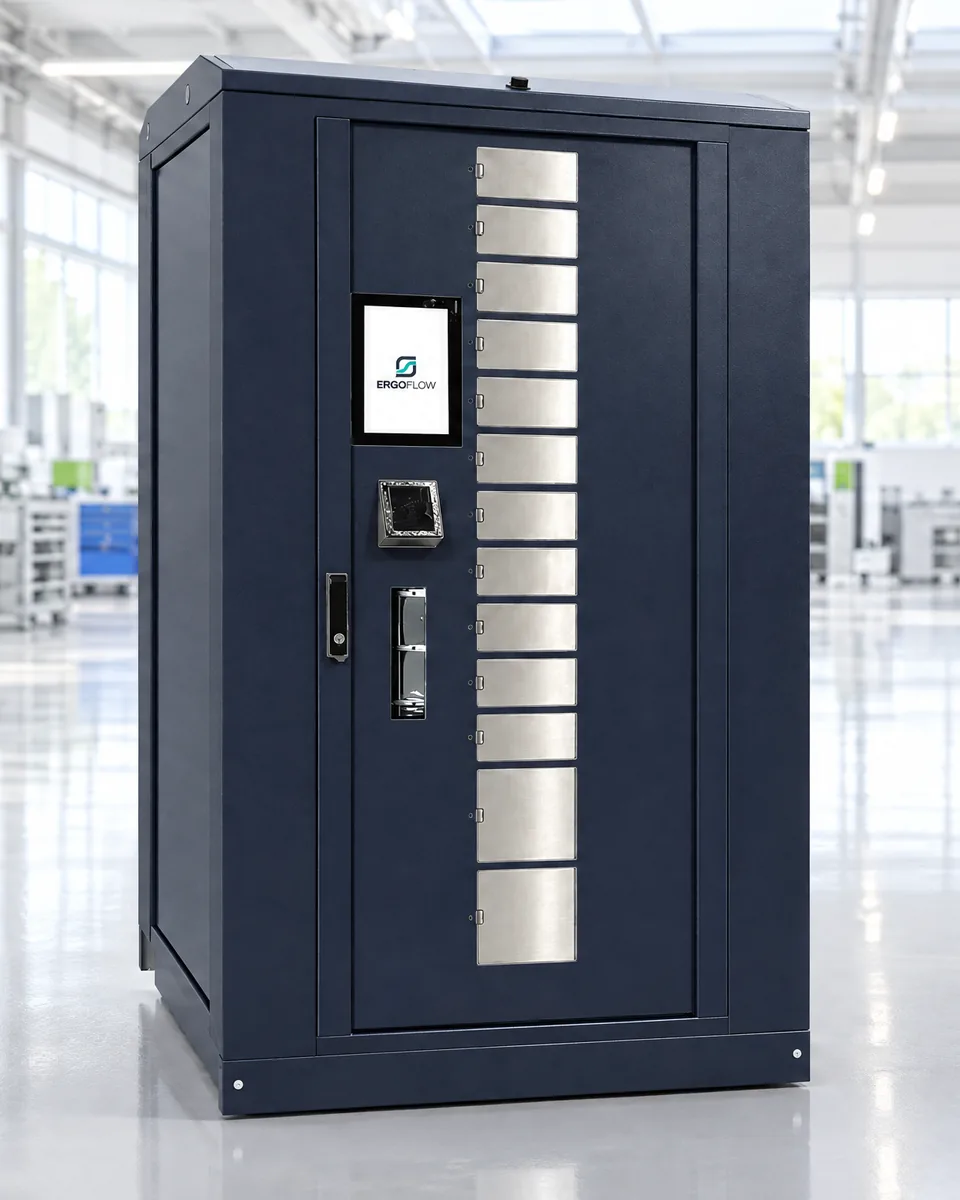
- SmartBox screen — login and selection
- Badge reader — badge or PIN
- Window with flaps — one flap per row
- Drum inside — brings the column to the window
A tool crib by the shop floor costs more than the invoice shows
Nobody plans uncontrolled consumption. It happens when issuing relies on trust and a notebook at the counter.
Withdrawals without a name
Gloves, discs and inserts disappear from the shelf, but nobody knows who took them or how many. The conversation about consumption starts with guesswork.
The data comes too late
Consumption shows up on the invoice or at the stocktake — when it is already too late to react.
Time is lost at the counter
Someone has to issue it, record it and account for it. The night shift waits until morning or stocks up in advance.
Shortages at the worst moment
An item runs out in the middle of a shift because nobody saw it going faster than usual.
Four steps, each of which leaves a trace
Go through an issue the way an employee does at the machine — on real SmartBox kiosk screens. Alongside, the drum moves to the compartment the withdrawn item comes out of.
Real SmartBox kiosk screens (version 1.7, ErgoFlow theme). The employee, items, stock levels and compartment numbers are sample data — this is not a view of a working machine or of customer data.
- 1IdentificationBadge at the reader or a PIN code. Without it, the machine issues nothing.
- 2Selection and allowanceThe employee sees their items and how many the rule lets them take, and sets the quantity.
- 3IssueThe drum rotates the column to the window and the door of one compartment is released.
- 4LoggingAn entry in the history: who, what, how many, when and from which compartment. The stock level goes down immediately.
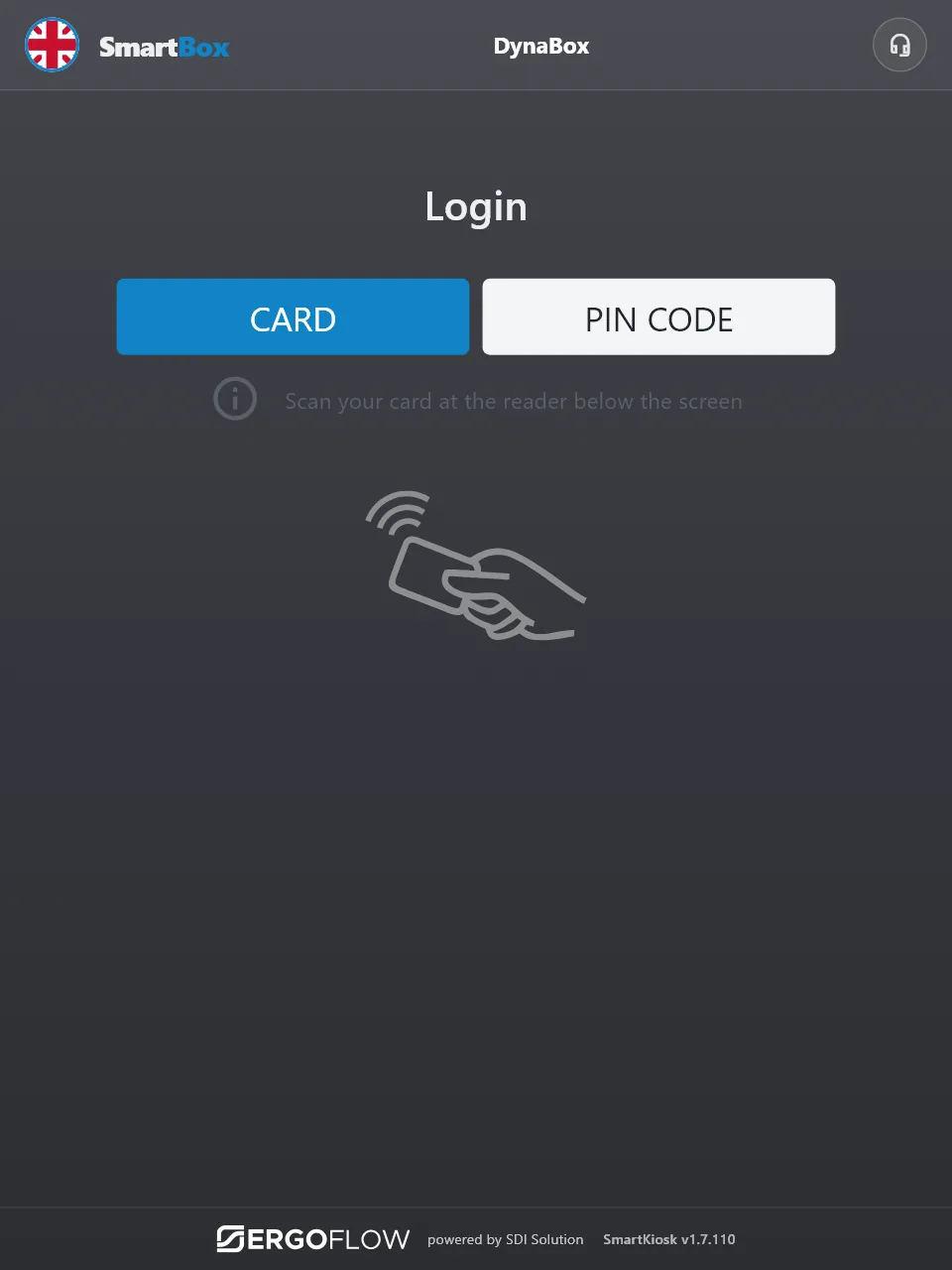
Tap your badge — click the reader below the screen.
The drum is waiting for an item to be selected on the screen.
| Time | Employee | Item | Quantity | Compartment | Status |
|---|---|---|---|---|---|
| An entry will appear here after the issue. | |||||
A rotating drum in a welded housing
Inside, a drum divided into columns and rows of compartments rotates. The column with the selected item moves up to the window, and the flap opens only one row.
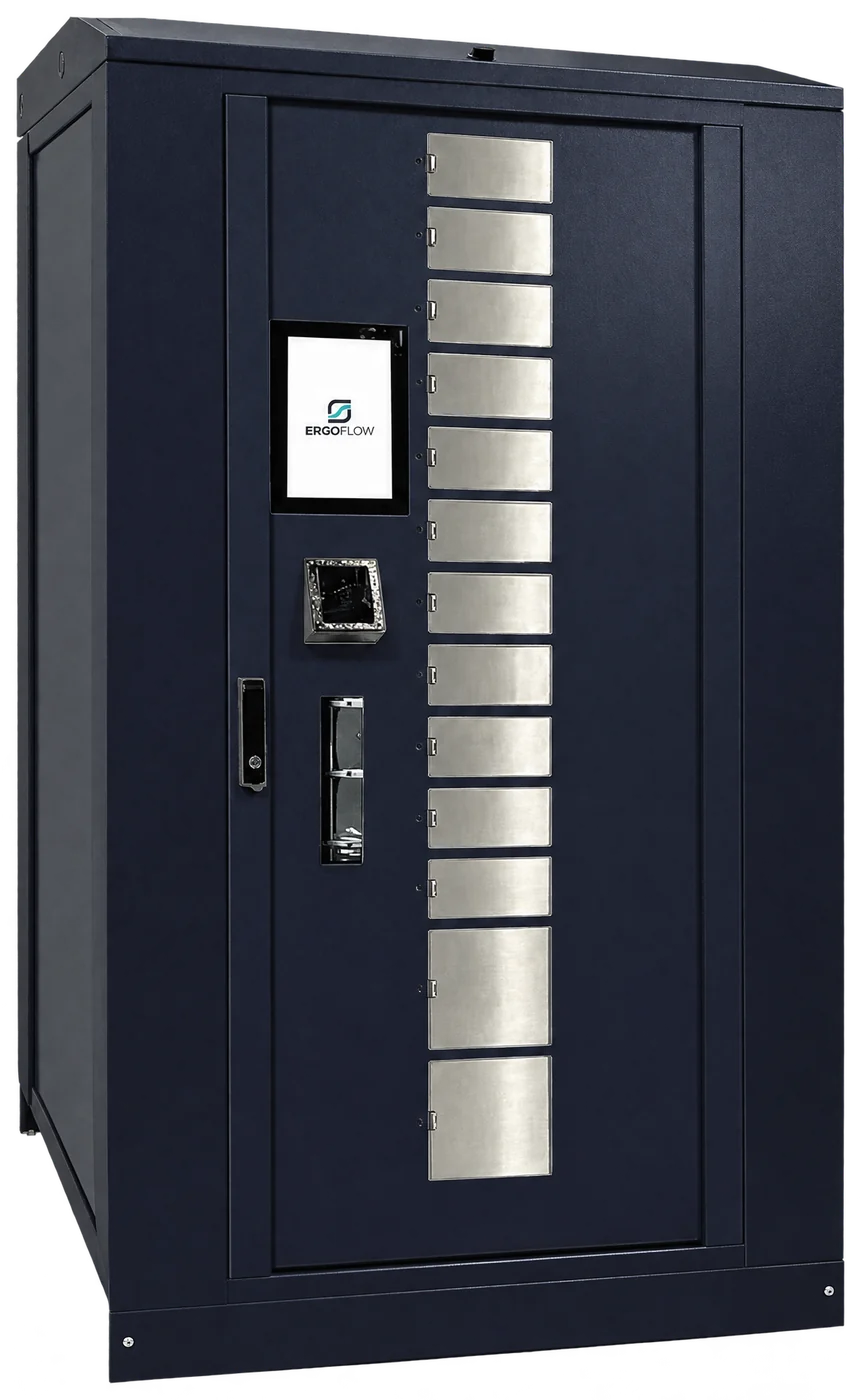
- 1Touchscreenmanufacturer
10.4″ or 15″ (manufacturer’s data). It runs the SmartBox kiosk — login, item selection, allowance messages.
- 2ID readermanufacturer option
Matched to the badge technology you already use; optional 1D/2D code reader (manufacturer’s data). SmartBox logs in with a badge or a PIN.
- 3Dispensing window with flapsmanufacturer
Sliding flaps, one per row of compartments. Only the flap of a compartment the employee is entitled to take from opens.
- 4Compartments in two heightsmanufacturer
In the DM13 version, the eleven upper rows are 85 mm each and the two lower ones 175 mm each — for smaller and larger items in one machine (manufacturer’s data).
- 5Lockable service doormanufacturer
Access to the drum for restocking and servicing. Manual release mechanism in case of a fault or power failure (manufacturer’s data).
- 6Load-bearing framemanufacturer
Welded housing on a load-bearing frame — the machine can be moved with a pallet truck or forklift (manufacturer’s data).
- 7SmartBox kiosk and panelErgoFlow
ErgoFlow software: permissions, allowances, transaction history, stock levels and reports for all machines in one panel.
Drag to rotate. Click a compartment — the drum will bring it to the window.
Diagram based on the manufacturer’s geometry: 18 columns around the circumference and compartment heights from the data sheet. It shows the principle of operation — it is not a CAD model. Columns can be divided more narrowly (from 1/18 to 1/72 of the circumference), so the number of compartments depends on the configuration.
- Dimensions (W × D × H)
- 1033 × 1033 × 1870 mm; DB15 and DM13: 1975 mm
- Models
- DB5, DB7, DM11, DB13, DM13, DB14, DB15 — from 5 to 15 levels
- Compartment height
- 253 mm (DB5), 175 mm (DB7), 85 mm (DB13–DB15); DM11 and DM13 combine 85 and 175 mm
- Capacity
- up to 1,080 compartments (DB15, type 4 drum); e.g. DB7 up to 504
- Compartment depth
- 405 mm (radial)
- Screen
- 10.4″ or 15″ touchscreen
- Identification
- badge reader matched to your ID badges; optional 1D/2D codes
- Expansion
- up to 15 of the manufacturer’s machines on one MASTER screen module, including machines without their own panel
- Connectivity (option)
- LTE / Wi-Fi router with external antennas, independent of the company network
Data from the device manufacturer (DynaBox data sheet). We choose the model and divider layout after an audit of your product range.
The machine issues. SmartBox remembers.
The machine is half the solution. The other half is the program that knows who may take what, records every issue and shows stock levels — for all machines in one place.
- Machine · manufacturer
DynaBox
- rotating drum with compartments and a window with sliding flaps
- touchscreen and ID reader
- manual release in case of a fault or power failure
- Software · ErgoFlow
SmartBox
- kiosk on the machine screen: login with a badge or PIN, item selection, messages
- allowances per person, group, department, workstation, machine or site — over a set period
- real-time transaction history and stock levels, replenishment thresholds and alerts in the panel
- reports with export to PDF, XLSX, CSV and XML
- offline mode: without a network it issues items with full permission and in stock
- Your systems · integration
ERP, HR, reports
- employee and group import from Excel or CSV
- API for external systems
- connection to ERP or WMS — scope agreed during rollout
Machine servicing is supported by SmartConf: an agent at the machine lets you check the controller status, error codes and transaction history remotely — without a VPN.
The same machine, four different reasons
Everyone in the company looks at issuing from a different angle. Choose yours.
Material is by the machine, not behind closed doors
- Issuing without a counter, on the night shift too.
- Shortages show up in the panel before an item runs out.
- Employees get what is assigned to their workstation.
In SmartBoxstock levels for every compartment and replenishment thresholds.
Small items at hand, with a history of every withdrawal
- Withdrawal without hunting for the storekeeper.
- History: who took an item and when.
- A machine fault opens a service ticket, and the service team sees the error code remotely (SmartConf).
In SmartBoxtransaction history with person, item and time.
Consumption with a name, not from an invoice
- Withdrawals assigned to people and groups — a basis for the conversation about costs.
- Allowances curb “just in case” withdrawals.
- Reports exported to Excel and company systems.
In SmartBoxreports on the most frequently withdrawn items, people and trends, export to PDF, XLSX, CSV and XML.
Ordering based on consumption
- Withdrawal trends instead of estimating by eye.
- Stock alerts in the panel at the replenishment threshold.
- Machines at several sites in one panel.
In SmartBoxstock alerts and a trends report.
What does uncontrolled issuing cost you?
Enter your own assumptions. The result is an estimate — it shows the scale of the issue, not a promise of savings. We don’t ask for contact details.
An estimate from your assumptions — not a promised result
- Excess consumption per month
- —
- Excess consumption per year
- —
- Issue handling cost per month
- —
- Issue handling cost per year
- —
Hypothetical scenarios — annual effect
A scenario larger than the estimated excess consumption is capped at that amount — the saving on material cannot exceed the amount considered excess consumption.
How we calculate it
- Excess consumption = spend × share of excess consumption. Annually × 12.
- Handling cost = hours × hourly cost. This is a separate cost — we do not add it to excess consumption.
- Scenario = spend × scenario percentage, but no more than the excess consumption. Plus, separately, time: handling cost × share taken over by the machine.
- Payback period = implementation cost ÷ monthly effect of the scenario. We only calculate it when you enter the implementation cost and the effect is greater than zero. It does not include maintenance costs.
For things that go out every day
The drum works best where there are many items, they are small and issued often.
Personal protective equipment
Gloves, safety glasses, earplugs and ear defenders — items issued every day.
Consumables
Discs, abrasives, screws and fast-moving small items.
Tools
Tools that fit in a compartment — every withdrawal assigned to a person.
Components and kitting
Small parts and kits issued to a workstation or job order.
Cleaning products
Issued per shift instead of from an open cabinet.
First aid kit
The manufacturer also provides for dispensing medicines.
Maintenance
Small parts and materials for maintenance teams, available at any time.
Shift-based production
The same access on every shift, without waiting for the warehouse to open.
What it does not do. The drum is not suitable for large equipment — power tools, laptops and returnable equipment go into the LockerBox locker dispenser. View LockerBox
What works straight away and what we will agree
We don’t promise integrations that don’t exist. Every item has its own status.
- in SmartBoxworks in the program today
- as part of rolloutwe set it up for you at launch
- to be agreedscope depends on your systems
- Employee and group importin SmartBox
Import wizard for Excel or CSV.
- API for external systemsin SmartBox
Access to SmartBox data for your applications, token-based.
- Report exportin SmartBox
PDF, XLSX, CSV and XML — for spreadsheets and reporting systems.
- Panel login via SSOin SmartBox
Administrator login via Keycloak. Connecting Active Directory is agreed separately.
- SupplyPoint Systems softwarein SmartBox
Reading data from SupplyPoint into SmartBox.
- ERP and WMSas part of rollout
Stock levels and issues in your ERP or WMS — via API or SmartSync. The scope depends on the system.
- Remote machine servicing (SmartConf)as part of rollout
Controller status, error codes and service tasks remotely, without a VPN.
- E-mail and SMS notificationsto be agreed
Today, stock alerts are in the panel. Message sending is agreed during rollout.
- HR and time trackingto be agreed
Employee synchronisation with the HR or time and attendance system — depends on the system.
Find out where to start
Five short steps. At the end, a direction for the solution and a list of things to check — without pretending the model can be chosen remotely.
- 1What you issue
- 2Problem
- 3Scale
- 4Result
- 5Contact
What do you want to issue from the machine?
You can tick several.
What isn’t working today?
Tick everything that applies.
What scale?
Whatever you don’t know — tick “Don’t know” or skip it. We will settle it on the call.
Result — a direction, not a model selection
We set the exact configuration — model, divider layout, capacity — only after checking the dimensions of your items, turnover and on-site conditions.
Let’s discuss a solution for your company
We will attach your answers to the enquiry — no need to repeat them.
Before you ask
Is DynaBox a machine designed by ErgoFlow?
No. DynaBox is a drum dispenser from a Polish manufacturer — the technical data on this page comes from its data sheet. ErgoFlow selects the configuration, rolls out the machine, supplies the SmartBox software and looks after the whole issuing process.
What fits in a compartment?
Compartments are 85 to 253 mm high (depending on the model) and 405 mm deep, and the width depends on how the columns are divided. Larger equipment — power tools, laptops — goes into the LockerBox locker dispenser. We set the exact layout based on your product range.
How will employees identify themselves?
In SmartBox — with a badge at the reader or a 6-digit PIN. We match the reader to the badges you already use; we check whether your current badges will work before the rollout.
What if the network or power goes down?
The SmartBox kiosk switches to offline mode and issues items the employee has full permission for and that are in stock. In case of a fault or power failure, the machine has a manual release mechanism (manufacturer’s data).
What happens in the event of a fault?
The kiosk reports the fault to technical support and marks the compartment as unavailable. The service team sees the controller status and error code remotely in SmartConf.
Who restocks the machine?
Your warehouse team, or us under the service model. SmartBox shows stock levels and alerts at the replenishment threshold, so restocking is planned rather than an emergency.
Will you connect it to our ERP?
We build the ERP or WMS integration as part of the rollout — via API or SmartSync. The scope depends on the system and on what should go into it: stock levels only or issues per person. We agree it at the audit.
Do we have to buy the machine outright?
No. We work on a purchase model or vending as a service. We work out which comes out better at the audit.
Book a DynaBox demo
We will show the machine and SmartBox using examples from your product range. The call ends with a list of items that make sense in the drum and a proposed configuration.
- A short callAbout what you issue and how it works today.
- DemoThe machine and SmartBox on your own examples.
- ProposalDrum configuration, rollout model and quote.