

Vertical lift modules
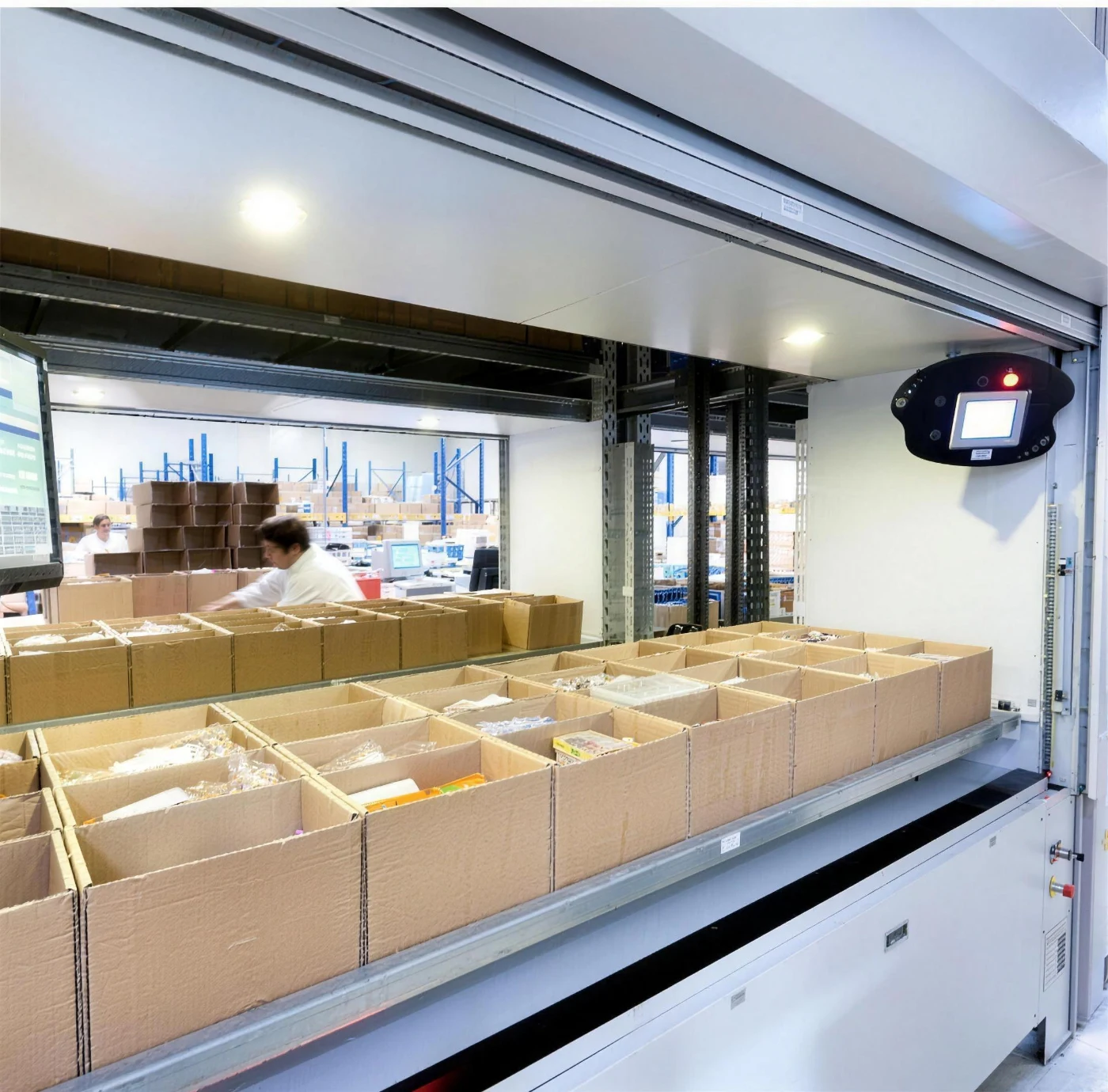
A vertical lift module is an enclosed column with two walls of trays, at the front and at the back. Between them runs a platform that pulls out the selected tray and delivers it to the access window at worktop height. The operator selects an item on the keypad, and the system remembers what is on which tray and in which zone. Nobody climbs a ladder, drives a truck between aisles or searches the shelves.
How it’s built
The platform moves along a toothed rack rather than on a chain: according to the manufacturer, this design reduces the risk of failure and gives precise positioning. The JUMPER 300 has a single drive and trays of up to 300 kg; the JUMPER 500 has four motors (two for vertical movement, two for horizontal) and trays of up to 500 kg. The whole unit holds up to 60 tonnes. The housing and trays are powder-coated in RAL colours. It is operated from an LCD keypad with code access, and the access window is closed off by class 4 light barriers that stop movement when someone reaches inside during travel; optionally, an electric curtain covers the window.
The zone indicator uses LEDs to show where on the tray to pick the item from. Zones are configured in 25 mm steps, from one to several dozen per tray, so a single tray handles both small parts in containers and larger items.
Parameters that matter
The height of the unit is matched to the building: the VLM uses the full height of the room, because the space saving comes precisely from going vertical. According to the manufacturer, the floor space taken falls by as much as 85% compared with conventional shelving. The trays have adjustable depth and number of levels, and can be divided with dividers and containers.
The access window can be at the front, at the back or on both sides, so that two people can work at the same time. When the unit is installed across floors, windows can be placed at the top and at the bottom, so one store serves two floors.
Options we select for the process
- a barcode and proximity badge reader at the window,
- ESD protection for electronics: galvanised guides and brushes that discharge static,
- storage in a controlled environment: ventilation, air conditioning, temperature and humidity sensors,
- fire and gas detectors,
- an electric curtain protecting the goods in the window,
- access by code or badge, with a record of who took what.
Where it works best
Tool cribs and maintenance stores, automotive spare parts, electronic components, pharmaceuticals and medical devices, e-commerce with a large number of small SKUs. Wherever picking time matters, and so does certainty that the right thing was picked.
With SmartStock software
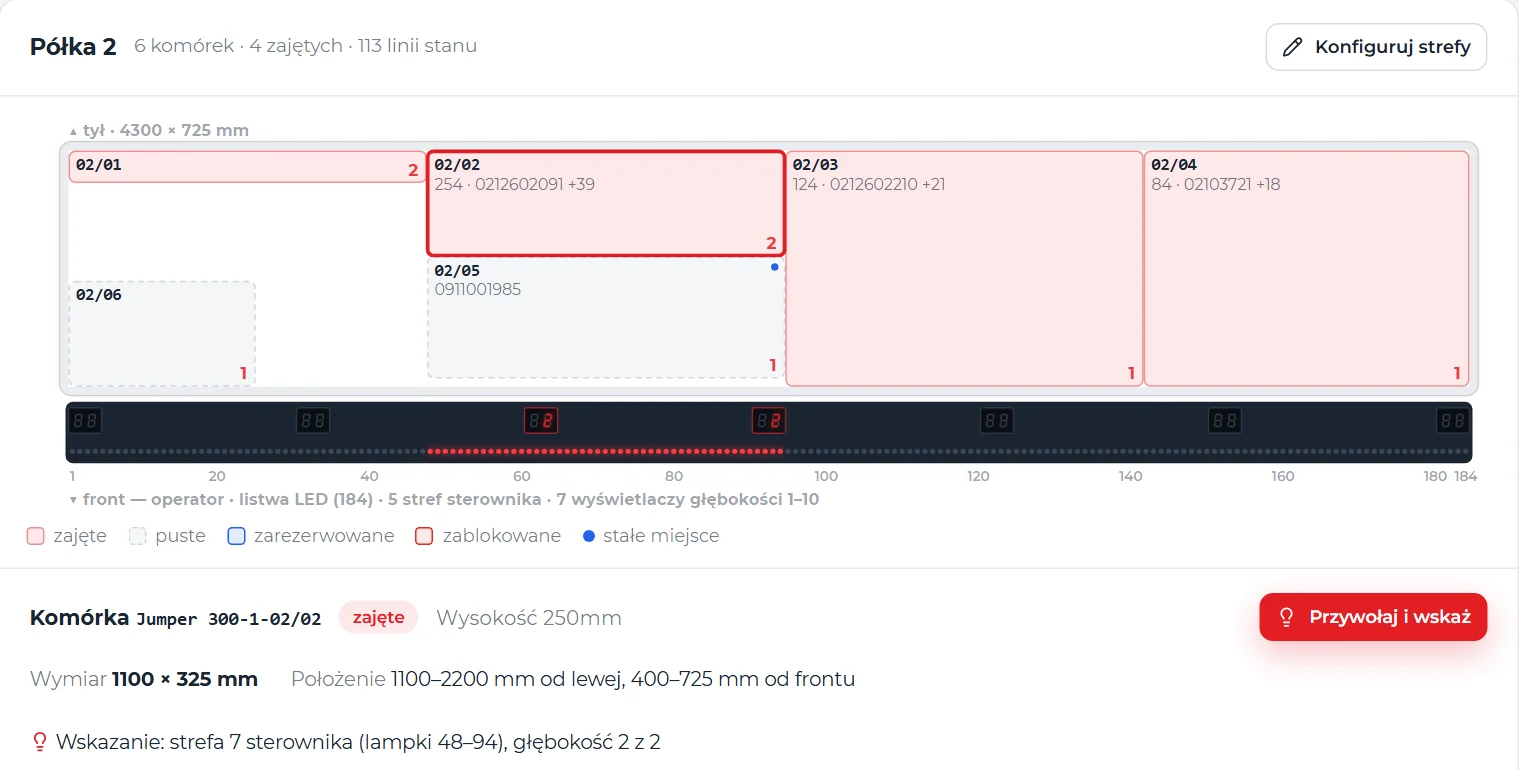
The VLM is run by our SmartStock software. The operator scans an item or selects an order line on the screen at the VLM, and the VLM delivers the tray to the window. The LED strip above the front of the tray switches on the lights below the cell, the display shows which cell it is, counting from the front, and the machine screen shows how many pieces to take, the code, name and address. Stock changes only when the operator presses OK on the panel. If the next line is on the same tray, the indication moves without moving the tray. The cell map of each tray is drawn in millimetres, and the strip zones go to the controller automatically.
What we do as ErgoFlow
We don't sell just the cabinet. We start with a process audit: what is withdrawn, how often, by whom and what goes missing today. On that basis we choose the size of the VLM, the tray layout and the options. We run SmartStock on a server in your network, draw the tray maps and connect the unit to your ERP or WMS through the SmartSync module, so that stock levels and withdrawals are visible in the system you already have, not in yet another separate panel. We handle installation, commissioning and training, and then service. The manufacturer gives a two-year warranty on the unit and its components, with a mechanical and IT support line; the warranty can be extended.
Key benefits
From badge to pick, without searching the tray
This is what one issue from a vertical lift module run by SmartStock looks like: the computer at the window and the VLM work together, and the operator does not leave the workstation.
- Badge to the reader the operator logs in with an RFID badge, no password at the machine.
- Line and “Call tray” chosen from the issue list, one click.
- The lift delivers the tray it travels along the guides to the shelf, pulls out the tray and brings it down to the window.
- The LED strip points to the box “Done” on the screen and what to pick.
- The tray returns after picking, the tray goes back to its place and the app logs out.
An issue from a vertical lift module — try it yourself
A simulation of what happens at a VLM with SmartStock: tray recall, cell indication by LED strip and depth, the operator's OK and posting. Change the tray layout to see how the strip zones change. The data is sample data, and the tray takes 2 seconds here instead of 15–20.
- Scan or order lineThe operator scans an item and enters the quantity, or executes an order line. The software chooses the cell by FIFO, FEFO or LIFO.
- The tray arrivesThe task goes into the workstation queue. When the window is free, the VLM delivers the tray — in our rollout in 15–20 seconds.
- The cell lights upThe LED strip switches on the lights below the cell, the display shows the depth, and the machine screen: how many to take, the code, name and address.
- OK and postedThe operator takes the goods and presses OK on the panel or “Confirm” in the app. Only then does the stock level change and a history entry get created.
- Next or returnNext line from the same tray — the indication moves, the tray stays put. From another one — the tray goes back and the next one arrives.
When there is not enough stock, the software shows how much there is — nothing is split silently. A movement that did not post after the OK waits in the workstation queue with an error description: to be posted or skipped.
Tray map in SmartStock
In SmartStock, every tray has a cell map in millimetres. Click a cell to see what indication the VLM will receive: the range of strip lights and the depth.
- The LED strip above the front of the tray switches on the lights below the cell.
- The depth display says which cell it is, counting from the front.
- Machine screen how many to take, item code and name, address.
- OK on the panel only then is the movement posted.
How it has worked at a client's site since October 2026
Two JUMPER 300 VLMs run by SmartStock: at the VLMs, one computer with an agent for each VLM; in the office, the same app in a browser.
Technical data
Values according to the manufacturer’s data; we select the specific dimensions and configuration after the audit.
- Tray load capacity
- up to 300 kg (JUMPER 300) or up to 500 kg (JUMPER 500)
- Unit load capacity
- up to 60 t
- Floor space saving
- up to 85% compared with conventional shelving
- Construction
- two walls of trays (front and back), a platform between them on a toothed rack
- Drive
- JUMPER 300: single; JUMPER 500: four motors, two each for vertical and horizontal movement
- Controls
- LCD keypad with code access, optionally a badge and a code reader
- Safety
- class 4 light barriers, optional electric curtain
- Zone indicator
- LED strip above the front of the tray and depth displays; cell map in millimetres, 25 mm grid
- Software
- SmartStock: tray recall and return, cell indication, posting after OK, kiosk at the window
- Access windows
- front, back, both sides; optionally top and bottom (two floors)
- Finish
- powder coating, RAL colours
- Options
- ESD, controlled environment, fire and gas sensors
- Warranty
- 2 years, extendable
Interested? Book a demo
Tell us what you need. We will show you how JUMPER works and prepare a quote — or pick a time for a call right away.
- A short callAbout what you need and how things look today.
- DemoJUMPER using your own examples.
- ProposalRollout scope and quote.