

SmartDesk — service desk
SmartDesk is our service desk: tickets from the website, e-mail and phone go into queues with an owner and a deadline, customers book a meeting on the website and confirm it from an e-mail, and reports tell you whether you meet deadlines. Machine servicing, in-house IT, complaints, distributor support.
- Tickets from the website in a second
- Owner and Teams
- Queues and deadlines
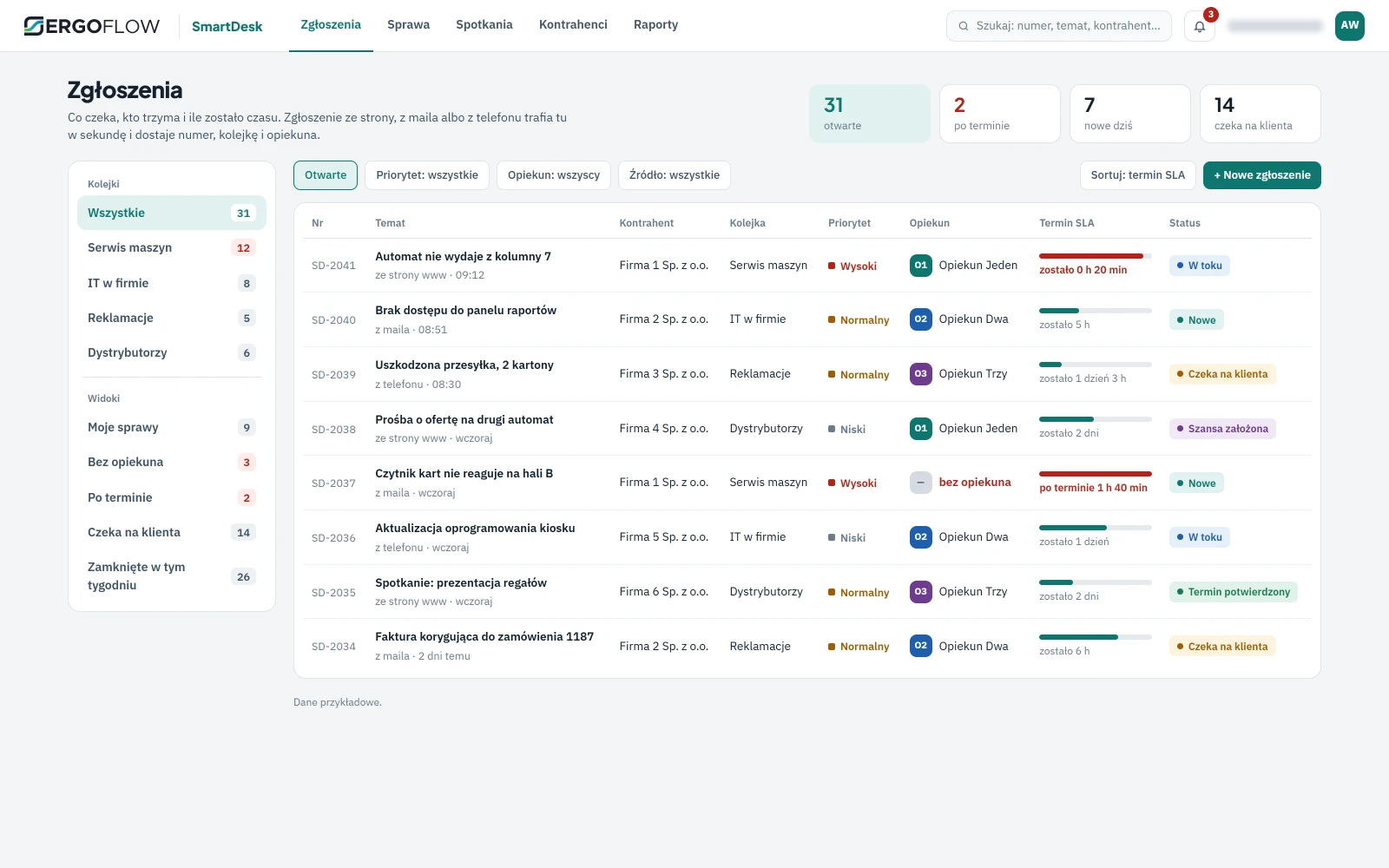
SmartDesk is the ticketing system our own customer service works on: forms on ergoflow.pl arrive in it within a second. Each ticket gets a number, a queue and an owner; the owner gets a notification in Teams, and the customer an e-mail with the case number and a link to book a meeting. A ticket from a company that is already in the database immediately has its account, service contract and previous cases to hand.
Customers book meetings themselves, from the calendar on the website or from an invitation in an e-mail, and confirm them with one click. Only a confirmed slot goes into the host's calendar, so nobody waits for a customer who won't show up.
Key benefits
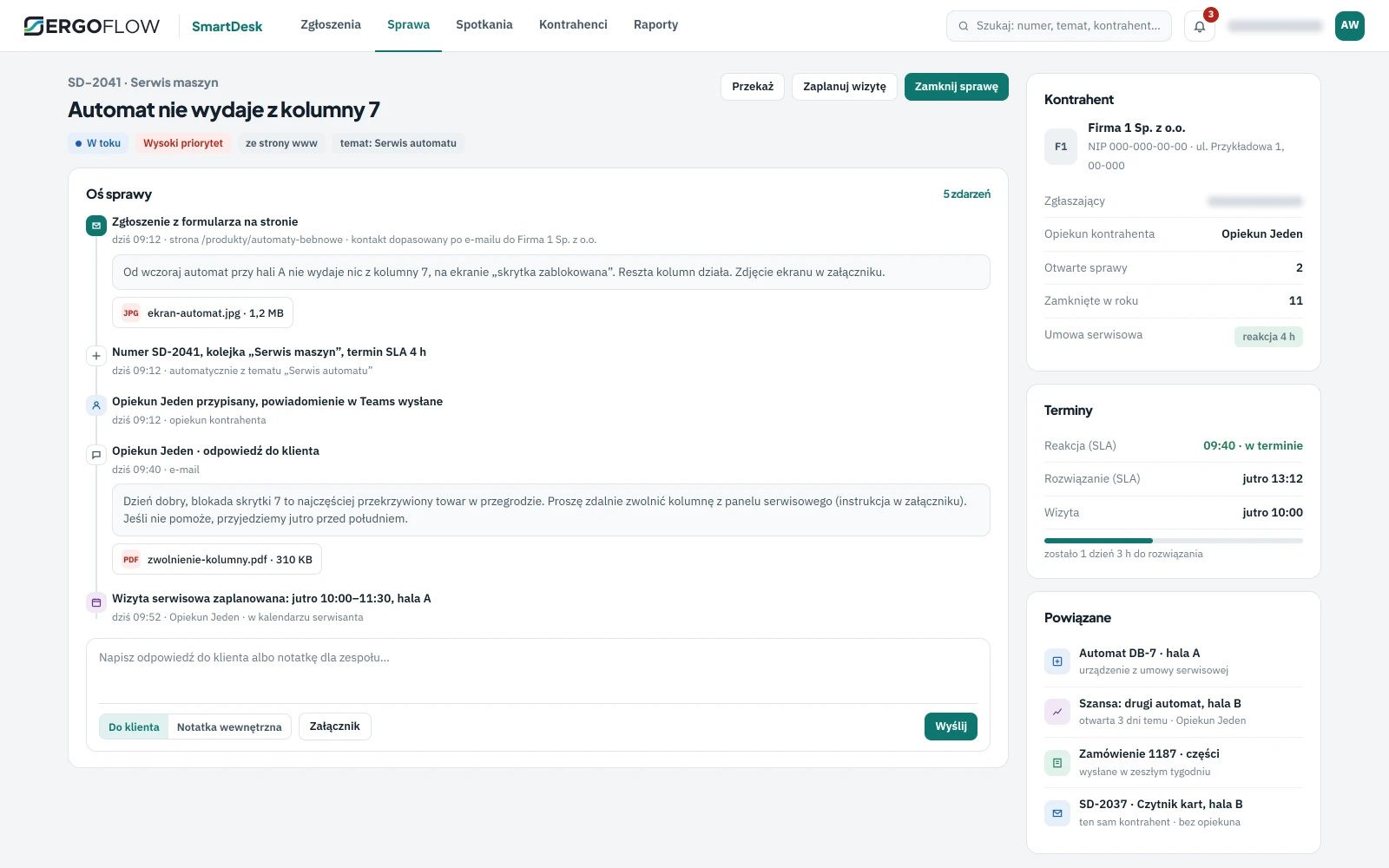
From form to visit, without retyping
A ticket from the website immediately has an account matched by e-mail, a number, a queue based on the topic and an owner. The reply to the customer goes out by e-mail from the case timeline, the internal note stays within the team, and the visit goes into the service technician's calendar.
- Notification in Teams the owner sees a new case where they already work.
- Service contract on the case the response time from the contract sets the deadline, and the bar counts down what is left.
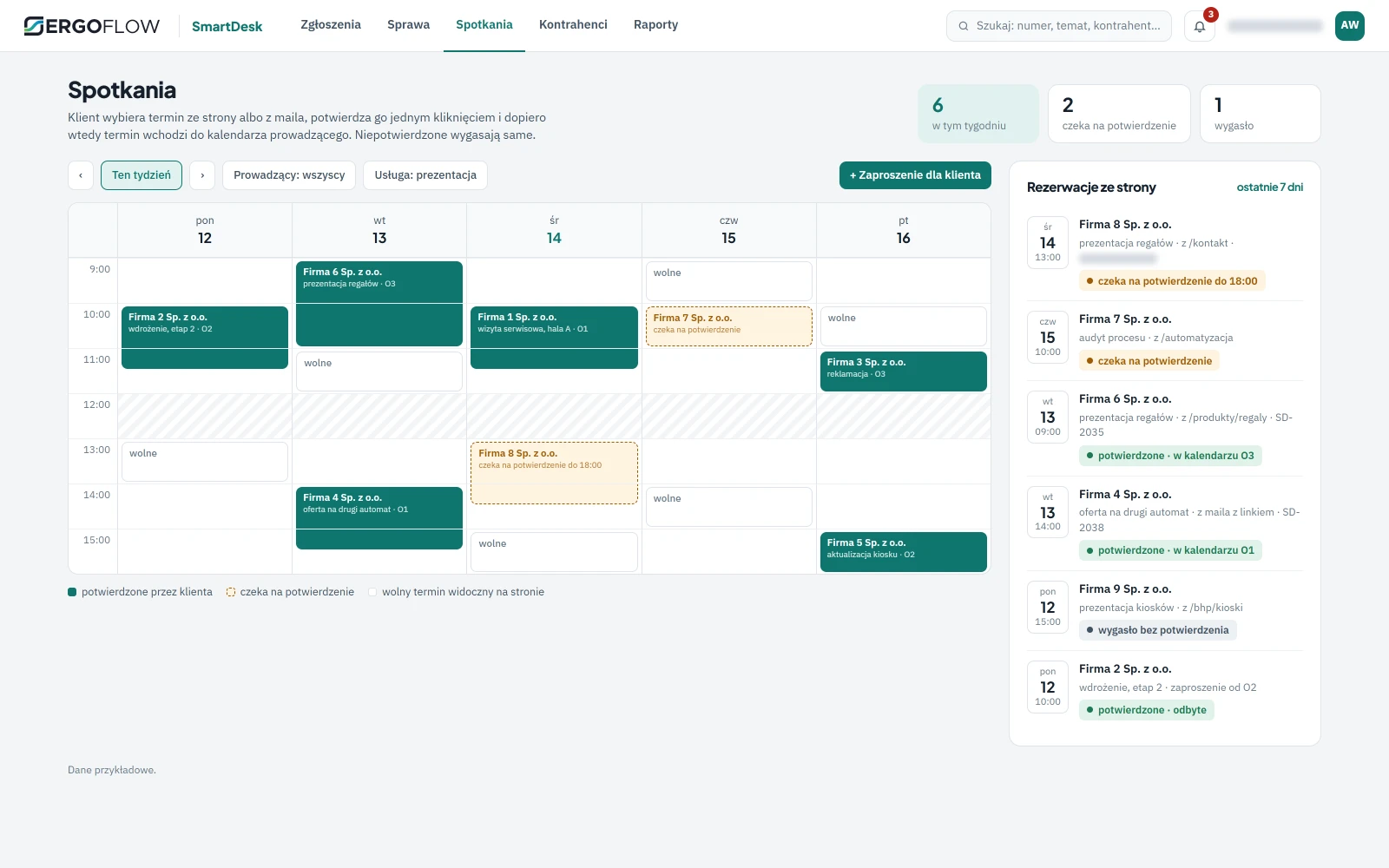
The customer picks a slot and confirms it themselves
The calendar on the website shows the hosts' available slots. A booking waits for confirmation from the e-mail and only then goes into the calendar; an unconfirmed one expires. One e-mail address can have one active meeting, so nobody blocks three slots at once.
- Invitation from the owner a link to their personal schedule in the e-mail sent after the enquiry.
- Slot taken? The calendar knows the page reloads the available slots instead of accepting a double booking.
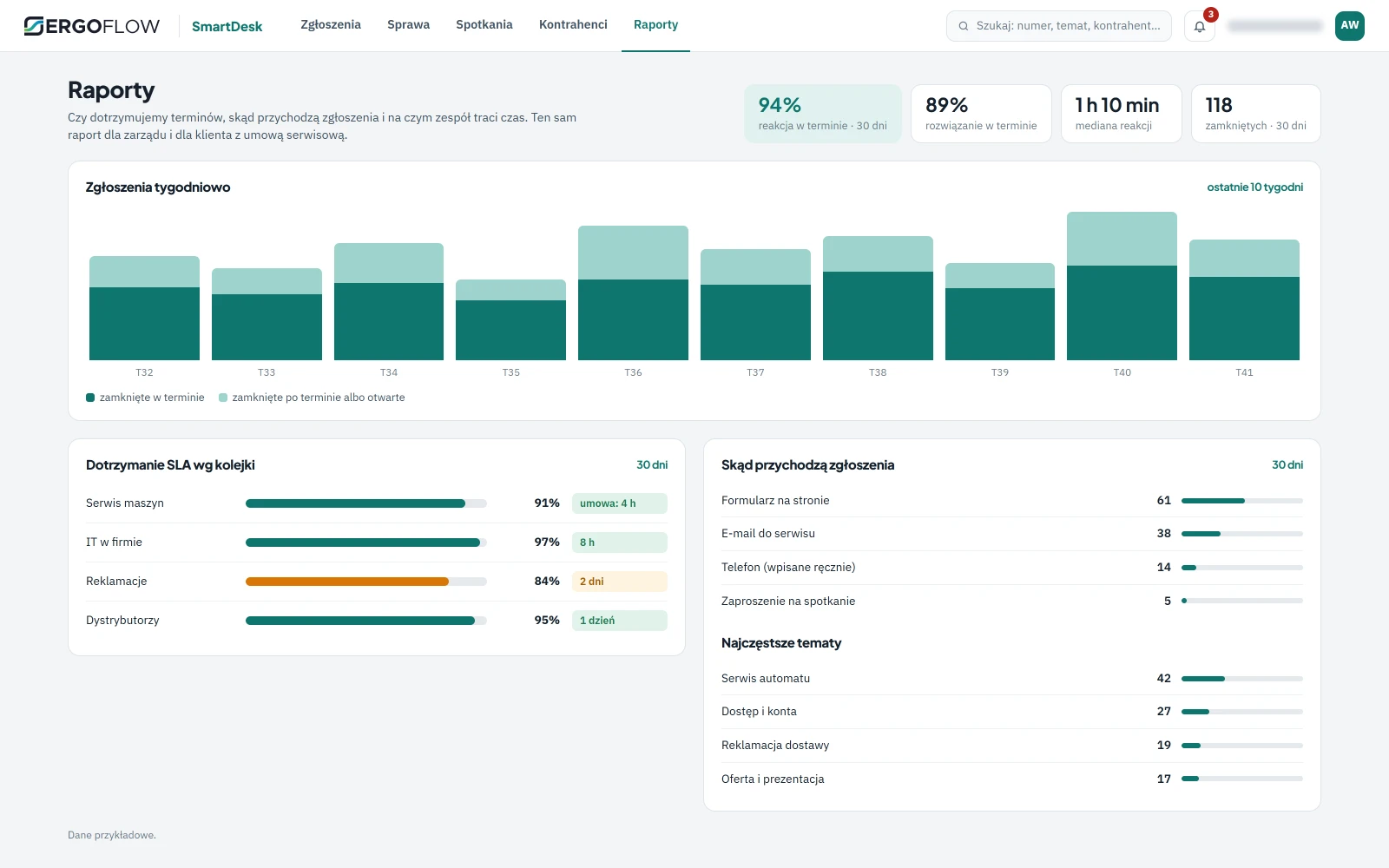
You can see at once whether you meet deadlines
Response and resolution on time by queue and owner, where tickets come from and on which topics the team loses time. The same report every week for the team and every month for the customer with a service contract.
- Report for the customer service contract compliance on their cases, with no manual compiling.
- Sources and topics form, e-mail, phone; the most common topics hint at what to improve in the product.
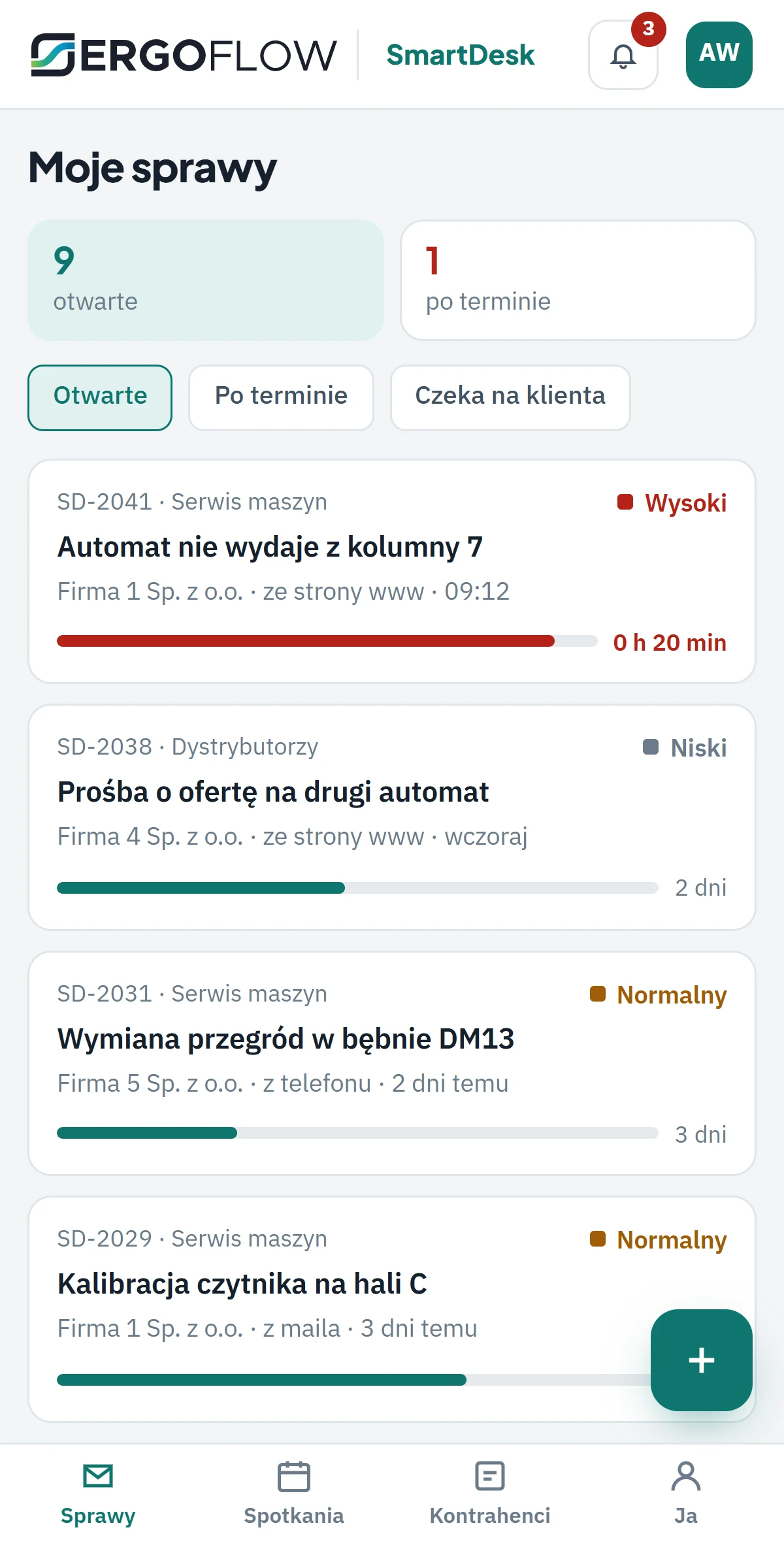
The service technician replies from the shop floor, not the office
The case list, replying to the customer and closing work in the phone's browser with no installation. A notification from Teams opens the case straight away.
- No app to install company login in the browser.
- A deadline on every case a red bar tells you where to start the day.
A service desk without corporate overhead
SmartDesk was built for companies that serve customers through several channels at once: a website form, a service mailbox, a phone call to a sales rep. Without a system, a ticket lives in one person's inbox, and the customer calls to ask what's happening with their case. With a system, every ticket has a number, an owner and a deadline, and a report shows where the team can't keep up.
Where it fits
| Team | What goes into the queue | What sets the deadline |
|---|---|---|
| machine servicing | breakdowns, inspections, parts | response time from the service contract |
| In-house IT | access, accounts, hardware | response time by priority |
| complaints | damaged deliveries, invoice corrections | deadline for replying to the customer |
| distributor support | requests for quote, materials, presentations | quote deadline, meeting |
Where we know it from
Our own support team works on SmartDesk: all forms on ergoflow.pl, including the configurator and the calculator, arrive in it as enquiries, and the calendar on the Contact page shows available slots from this system. An enquiry from a company managed in SeedRM has its account and opportunities to hand; an order from the B2B Platform can open a service case. The three apps share accounts, so there is no need to retype them.
Tickets running for you within a week, the rest after a review
Connecting the website forms and the service mailbox is the first step. We set up queues, deadlines and reports after reviewing how you serve customers today.
Tickets and meetings
Website forms and the service mailbox in queues with an owner, a meeting calendar with confirmation on your website.
- number, owner, deadline
- Teams and e-mail to the customer
- calendar on the website
Queues, contracts, reports
Your own queues and topics, response times from service contracts, equipment on the account, reports for management and customers.
- SLA from the contract
- equipment and orders on the case
- report for the customer
With SeedRM and the B2B Platform
Shared accounts in the CRM, service desk and ordering portal: a request for quote becomes an opportunity, an order becomes a service case.
- one shared account database
- opportunity from an enquiry
- case from an order
Questions about SmartDesk
Does the customer have to log in to raise a ticket?
No. The ticket comes in from the website form or by e-mail, and the contact is matched by e-mail to a company in the database. The customer gets an e-mail with the case number and a link to book a meeting.
How does meeting confirmation work?
A booking from the website waits for a click on “Confirm meeting” in the e-mail. Only then does the slot go into the host's calendar; an unconfirmed booking expires and the slot returns to the website. One e-mail address can have one active meeting.
Does the owner have to be logged in all the time?
No. A new case arrives as a notification in Teams, and the reply to the customer can be written from the case timeline in the phone's browser.
Does this replace a CRM?
No. SmartDesk handles cases and meetings, SeedRM handles sales. Both apps share accounts, so a request for quote from the website opens an opportunity in the CRM, and the service team sees who the sales rep is talking to.
What if someone sends the same enquiry twice?
An enquiry from the same address within a ten-minute window does not open a second case. The service team doesn't get duplicates after a customer has clicked “Send” twice.
Where is the data?
On a dedicated instance for your company: on our server in Poland or on yours. Website forms connect to the system via an API with a key that never reaches the browser.
Technical data
We agree the integration scope and configuration at the audit.
- Role
- service desk: tickets, cases, meetings and customer service reports
- Ticket sources
- website forms (API), e-mail, manual entry from a phone call, meeting invitation
- Ticket
- number, topic from the topic list, queue, priority, owner, deadline; contact and company matched by e-mail; deduplication in a 10-minute window
- What an enquiry becomes
- contact, sales opportunity or helpdesk case, depending on the topic; owner notification in Teams; e-mail to the customer with a link to the booking schedule
- Meetings
- services and topics, available slots up to 31 days ahead, a website booking requires the customer's confirmation from the e-mail; one e-mail = one active meeting; invitations from the owner
- Case timeline
- reply to the customer, internal note, attachments, visit in the calendar, status changes
- Queues and SLA
- queues with their own response and resolution times, “no owner”, “overdue” and “waiting for customer” views
- Orders and opportunities
- opportunity from a request for quote, order and its status on the account
- Reports
- deadlines met by queue and owner, ticket sources, topics, closed in the period
- Phone
- case list, reply and closing from the phone's browser
- Rollout
- dedicated instance for the company, your own queues and topics, connection of website forms and the service mailbox
- Quote
- after a review of the service process
Interested? Book a demo
Tell us what you need. We'll show you how SmartDesk works and prepare a quote — or pick a time for a call right away.
- A short callAbout what you need and how things look today.
- DemoSmartDesk, using your own examples.
- ProposalRollout scope and quote.